![operabase-logo.png]](https://help.operabase.com/hs-fs/hubfs/Operabase%20Logos/operabase-logo.png?height=29&name=operabase-logo.png)
To add a production to your season on your Operabase page, follow these steps:
- Log in and click on “Edit” on your organisation page
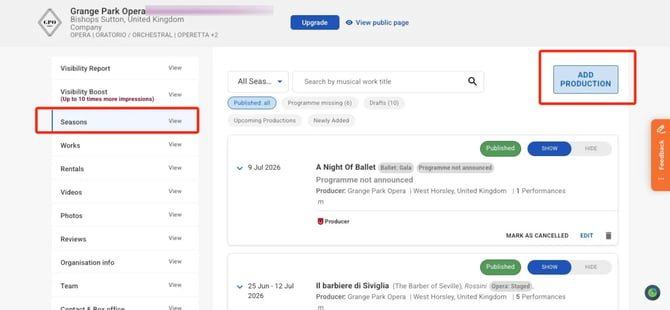
- Navigate to the “Seasons” tab
- Search for the production in your season by typing its name in the search bar. Ensure you check if the production or musical work has already been documented on Operabase, as we have documented all performances since 1996.
- If the production is not in your season, click on “Add production” and select one of the the options provided: Add production, or Revive production:
If the production is already on Operabase
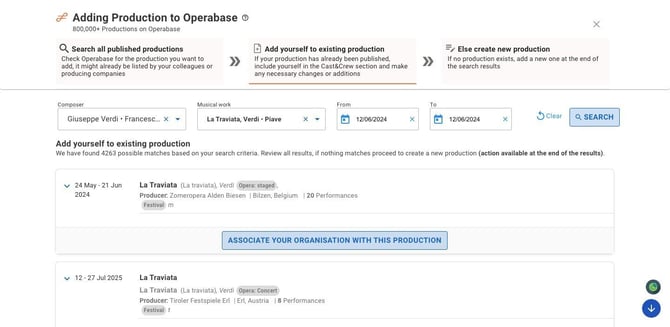
- Click "Add production," search using filters, and scroll the full results list before adding a duplicate.
- Select the production, expand it by the date arrow, review the details, then click "Associate your organisation with this production."
- You'll be redirected to the published production, with your organisation automatically added as a co-producer.
- Check every section: cast & crew, dates, venue, photos, videos, reviews — then confirm the production is listed in your schedule.
If the production isn't on Operabase yet
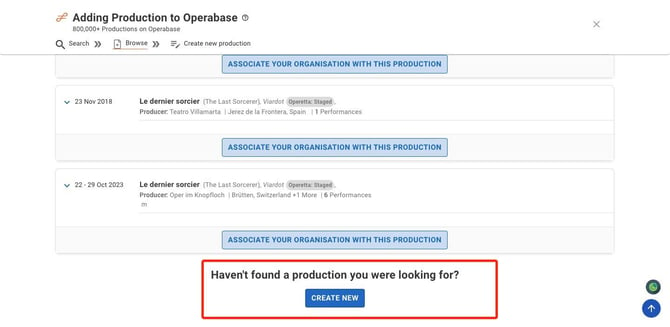
- Click "Create New."
- Add the musical work via "Add programme (musical work details)," including the composer and work.
- Add a Production Custom Title if relevant.
- Your organisation is added automatically under "Produced by" — add co-producers if needed.
- Add a website link under "Tickets & sale dates."
- Select performance dates (and livestream/full performance video dates if relevant).
- Add the Cast & Crew — this is what makes the production visible on each artist's profile.
- Add any extra details (videos, photos, ticket links) across the other tabs, then click "Publish" — or find it later in Drafts via the back arrow.

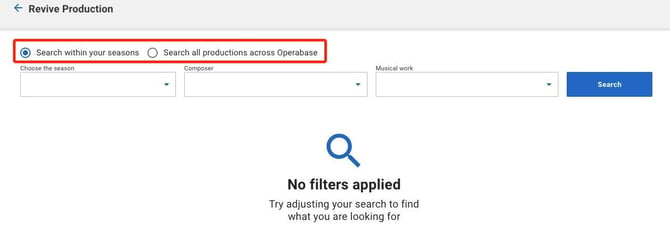
Revive production
Use this for popular repertoire being performed again this season (not for a work never performed at your organisation before). Search within your season or across Operabase, select the production, choose what to copy over, fill in the relevant sections, and click "Publish."