![operabase-logo.png]](https://help.operabase.com/hs-fs/hubfs/Operabase%20Logos/operabase-logo.png?height=29&name=operabase-logo.png)
How do I add myself to a production on Operabase?
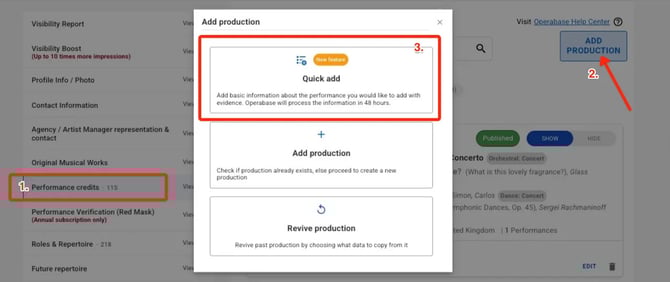
The simplest way to add a production to your profile is:
- Log in to your Operabase profile and once you're in Edit:
- Click Performance Credits
- Click Add a Production, then choose Quick Add
- Fill in all required details in the Quick Add form
- Upload or paste supporting evidence (links, programmes, press, or documents)
- Click Submit
Our team will review the submission and you will be notified once this process has been completed.
What if the musical works aren't fully announced yet?
To add a production with unannounced or partially announced musical works, follow these steps:
- Log in to your Operabase profile and click on “Manage profile”
- Navigate to “Performance credits”
- Click on "Add production"
- Search for any Musical Work using today’s date in both the “From” and “To” fields to see the button “Create new production”
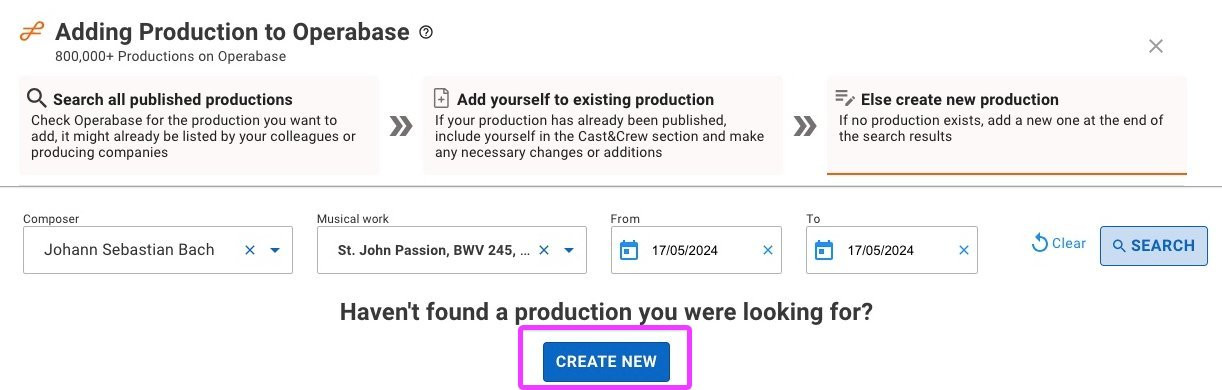
Please note that the production won't be easily discovered in Performance search and the Casting Tool since it is incomplete. Once the full programme is released, we recommend adding the full programme as soon as possible to your published production. Return to the production edit / suggest changes and use the "Add programme (musical work details)" button to add details of all musical works performed.
What happens if I don't add the programme after the first performance date passes?
- If the programme is not added to any published production, you will receive an email reminder to add the full programme 48hrs before the date of the first performance and again 24hrs after the performance. You will also receive a monthly email with a list of all incomplete productions with missing programmes. You can find all productions with missing programmes in Edit Schedule under the filter “Programme missing”

- You can find all such productions in your “Performance credits” under the filter “Programme missing”
- The production won’t be easily discovered by Operabase users (audience and industry professionals), who use musical work title and genre to find upcoming and past productions from around the world.
- Productions without or incomplete programmes won't be featured in the Casting Tool, as it is not possible to show contributors correctly i.e. what exact musical work part they performed.
How are productions with unannounced or partially announced musical works displayed on Operabase?
These productions are not hidden. Instead, labels indicating the missing programme are visible on display, including on production cards, production pages, and quick view. Operabase is committed to displaying accurate and up-to-date information, so we show these productions with the correct label instead of hiding them from the display.