![operabase-logo.png]](https://help.operabase.com/hs-fs/hubfs/Operabase%20Logos/operabase-logo.png?height=29&name=operabase-logo.png)
Livestream & Full performance videos
Livestream & Full performance videos are displayed on the home and video tabs on your profile.
Videos in this section cannot be edited / deleted as they are attached to a production in which you participated and are automatically linked to your profile via the company page. Artists with a subscription can show / hide videos in this section.
If a livestream / full performance video has been inaccurately linked to your profile, please email contact@operabase.com or suggest changes by editing the specific production in your schedule
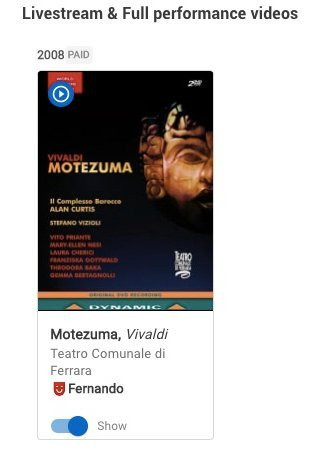
To add videos to this section, you will need to:
- Log in to your Operabase account
- Click "Manage profile" and scroll to the Performance credits section
- Find the production that will be live streamed or was used to record VOD
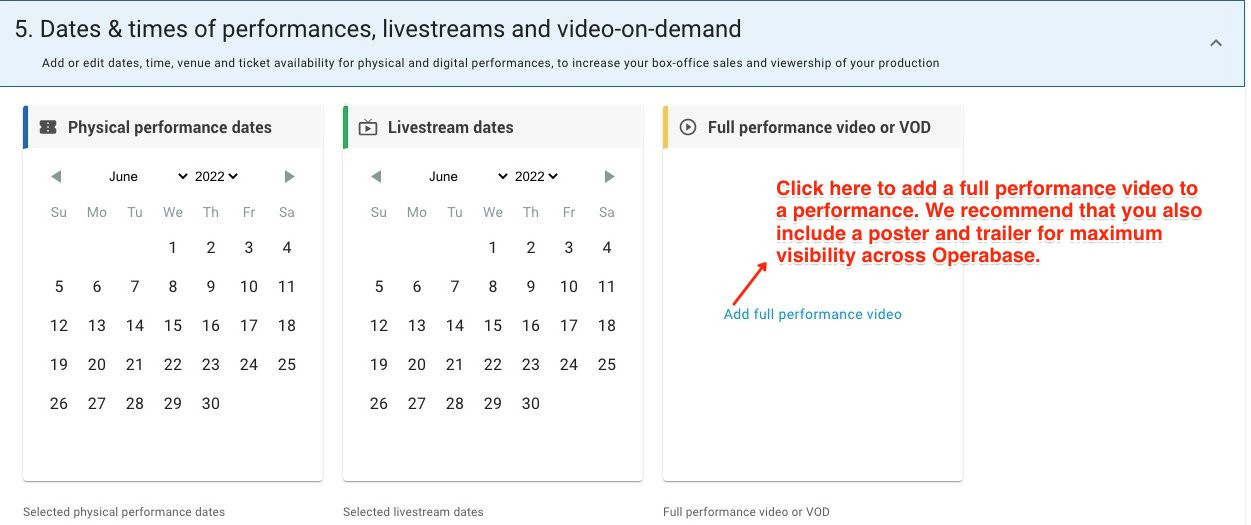
- Add your live stream, full performance or VOD video link directly to the production on your schedule
Intro showreel
Intro showreels are fairly audience-oriented as this is the first thing they'll see when they visit your profile. They are part of the media widget alongside your profile photo. We recommend adding a highlight of a live performance or an engaging video that you'd like to showcase to the global audience of 3 million using Operabase.
Please note that to add an intro showreel, you will need to subscribe to Operabase.
Under the Intro showreel section, you can:
- Add videos via URL or file upload
- Show / Hide videos
- Delete videos
- Edit videos
To add videos to this section, you will need to:
- Log in to your Operabase account
- Click "Manage profile" and scroll to the Video section
- Add your video link to the Intro showreel section and include the details. You have the option to select in which other section you’d want the video displayed.
Please note that you will need to have an active subscription in order to edit videos.

Audition showreel
The audition showreel is visible for users with access to the Operabase Casting Tool. This is where you can demonstrate your range of performances and career goals by adding videos that showcase your abilities. Our Casting Tool has 10,000 searches per month as casting professionals from around the world look for artists for their current and future productions.
Please note that to add an audition showreel, you will need to subscribe to Operabase.
Under the Audition showreel section, you can:
- Add videos via URL or file upload
- Show / Hide videos
- Delete videos
- Edit videos
To add videos to this section, you will need to:
- Log in to your Operabase account
- Click "Manage profile" and scroll to the Video section
- Add your video link to the Audition showreel section and include the details. You have the option to select in which other section you’d want the video displayed.
Please note that you will need to have an active subscription in order to edit videos.
Video clips & general profile videos
The videos you add here will be visible on the home and video tab on your profile. They can be viewed by our global audience of 3 million people around the world.
Under the Video clips & general profile videos section, you can:
- Add videos via URL or file upload
- Show / Hide videos
- Delete videos
- Edit videos
- Reorder videos - use the drag and drop feature to move videos around and arrange them in the preferred order
- Link video to existing production
Please note, as long as you have an active monthly/annual subscription, your profile videos will be visible on your profile page in the videos tab.
Production videos
Videos in this section cannot be edited / deleted as they are attached to a production in which you participated and are automatically linked to your profile via the producing arts organisation page during the season collection process. Artists with a subscription can show / hide videos in this section.
To add/remove videos to this section, you will need to:
- Log in to your Operabase account
- Click "Manage profile" and scroll to the Performance credits section
- Add your video link directly to the production on your schedule
- Submit change request

Please note that promotional videos chosen by a company may not feature you, therefore we recommend using the show/hide toggle to hide videos that you don't want to highlight. You can upload your preferred video and link it to the production and it will be featured in the production videos section.