![operabase-logo.png]](https://help.operabase.com/hs-fs/hubfs/Operabase%20Logos/operabase-logo.png?height=29&name=operabase-logo.png)
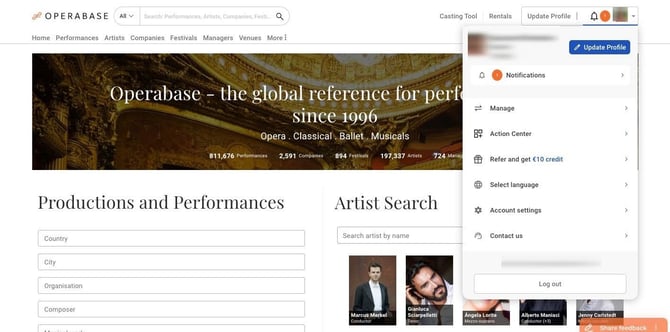
- Login to your Operabase account using your credentials
- Click on the avatar or initials in the top right
- Click on the “Update profile” icon which will redirect you to your profile
When logged in and viewing your public profile page, you will see the following buttons:
- Share - allows you to share your profile on social media, email and copy your Operabase profile link
- FAQs - Frequently asked questions about artist profiles, agency and organisation pages
- Share access - allows you to share access with other people so that the can access and edit your profile
- Visibibility Report - clicking on this will redirect you to your Visibility Report in Edit where you can view detailed profile analytics
- Manage profile - redirects you to the Edit section. Use this button to make changes/updates to your profile
Visibility Report
Every Operabase artist profile has a Visibility Report section that provides data about your visibility on the platform over time. This will only be visible to you if you are logged in and have access to your profile. These insights include:
- Impressions - indicates how many times your name and photo appeared on Operabase.
- Page views - indicates the number of times someone visited your public Operabase page
- Search appearances - indicates the number of times your name or photo appeared on searches done by casting professionals, industry professionals and audience members across Operabase
Please refer to our Visibility Report article for more.
Visibility Boost
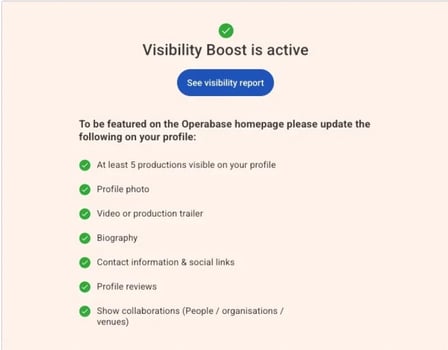
To be featured on the Operabase homepage, ensure the sections indicated here are updated.
Profile info
In this section, you can update:
- Your profile photo (please see photo guidelines here)
- Upload a Resume/CV
- Stage name / professional name
- Also known as (this information will only be visible in your Biography section)
- Your name (you can add your name in multiple languages by clicking on Add)
- Profession / voices / instruments - you can add multiple professions to your profile
- Genres
- Employment History
- Citizenship
- Birth information
- Gender
- Home base
Contact Information & Agency / Artist Manager representation & contact
In this section, you can add/update/edit:
- Your contact information (email & phone number) and select the preferred visibility from the options provided
- Your agency & representation information
Works
Artists/creators of original works including composers, librettists and choreographers, can now add new musical works directly to their profile under the Original Musical Works section. This feature enables you to showcase your compositions, operas, instrumental works, ballets, symphonies and more that are not yet listed on Operabase or have yet to be produced and performed. Please note that this section is for adding new musical works that you have created and not for submitting a missing musical work to Operabase.
Performance credits:
In this section, you can:
- View all productions you are associated with as a contributor (cast, crew or instrumentalist)
- Add a new production or add yourself to an existing production
- Edit existing productions or suggest changes to verified productions (Red Mask)
- Add missing programme details to productions (i.e. add all musical works performed in concert programme)
- Add missing cast, crew members, instrumentalists and ensembles
- Add promotional material such as posters, photos, videos, programme booklet etc.
- Add performance dates, times, and venues
- Add ticket links and box-office availability details
- Add livestreams or VODs
- Continue editing an unpublished production located in “Drafts”
- Show / hide a production
- Review new productions added to your profile
- Request performance verification (Red Masks) for productions - for annual subscribers only (see more on this process)
Performance Verification (Red Mask)
Grey mask (unverified) performances will be listed in this section. You can easily view all unverified productions on your profile here and request red mask verification by uploading proof of participation.
Roles & Repertoire
All the musical works and roles you see under this section on your Operabase Artist profile are auto-generated entries from your performed and upcoming announced productions.
You can:
- Mark existing repertoire records as active / retired if you no longer want to perform this role
- Hide repertoire entry (private / public visibility setting)
- SHOW/HIDE on your public overview page
To read more about repertoire management, click here.
Future repertoire
With a Premium subscription, you can list up to 5 Future repertoire records. Add roles that are prepared (ready to debut) and those that are unprepared to highlight your desired career direction.
To read more about Future repertoire, click here.
Photos
This section is divided into:
- Cover photo (This photo will appear across the top of your profile page in the media widget. If you'd like to feature a video in the media widget, you can use the "Intro showreel" option in your videos)
- Profile photos
- Production photos
You can add, show / hide, edit, delete and reorder photos in this section. Please note that you can only show / hide the photos under the Production photos section as these are added from the organisation page and are related to a production that you participated in. Read our photo article here.
Videos
This section is divided into:
- Livestream & Full performance videos
- Intro showreel
- Audition showreel
- Video clips & general profile videos
- Production videos
You can add, show / hide, edit, delete and reorder videos in this section. Please note that you can only show / hide the videos under the Production videos section as these are added from the organisation page and are related to a production that you participated in. Read our video article here.
Reviews
This section is divided into:
- Featured reviews - Add reviews highlighting your performance to feature on your profile page
- Production reviews
You can add, show / hide, edit, delete and reorder reviews in this section. Please note that you can only show / hide the reviews under the “Production reviews” section as these are added from the organisation page and are related to a production that you participated in. Read our review article here.
Social Media / Web links
Adding your digital presence, such as social media links, to your Operabase profile is a great way to enhance your online presence and connect with your audience.
- Personal website
- Social presence (Instagram, Facebook, Twitter, LinkedIn, YouTube, etc.)
- Link to your page on an agency / theatre website
For all the above, you can determine the visibility of each link added.
Biography
In this section, you can:
- Add a biography in multiple languages
- Edit an existing biography
- Delete a biography
- Modify the privacy settings
Read more about the biography section here.
Worked With (People):
This section is visible on your public profile. You can choose to SHOW or HIDE this section. You have the option to customise it by adding or removing artists and arranging them in your preferred order.
Worked With (Organisations):
This section is displayed on your public profile. You have the option to SHOW or HIDE this section. You can customise it by adding or removing organisations and arranging them in your preferred order.
Performed At (Venues):
This section is displayed on your public overview page. You can choose to SHOW or HIDE this section. You have the option to customise it by adding or removing venues and arranging them in your preferred order.
Industry professionals and artist managers have the ability to manage information on their Operabase profile. Please note that certain features are paid.