![operabase-logo.png]](https://help.operabase.com/hs-fs/hubfs/Operabase%20Logos/operabase-logo.png?height=29&name=operabase-logo.png)
Operabase offers a feature that helps to distinguish between verified and unverified performances through the use of red and grey masks. This article provides a comprehensive guide on how to request a red mask, the performance verification process, and the significance of these masks on the platform.
Red and Grey Masks Explained:
Operabase uses red masks to signify verified performances, validated either by the arts organisation or the Operabase team. These verified productions are visible across the platform, including the Casting Tool. On the other hand, grey masks denote unverified productions added directly by artists or agencies, visible only on the artist's profile.
Requesting a Red Mask:
Available for Annual Subscribers Only
To request a red mask, follow these steps:
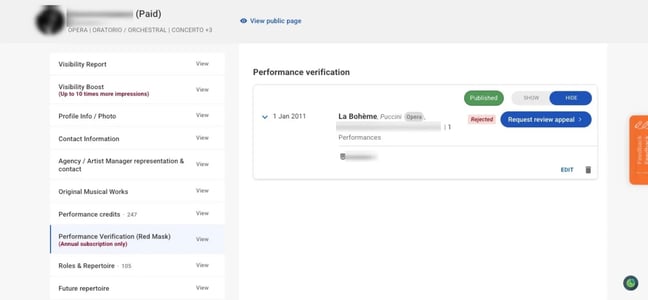
- Log in to your Operabase account and navigate to your profile Edit page under Performance Verification (Red Mask).
- Select the production you want to have verified with a red mask.
- Click on "Request red mask."
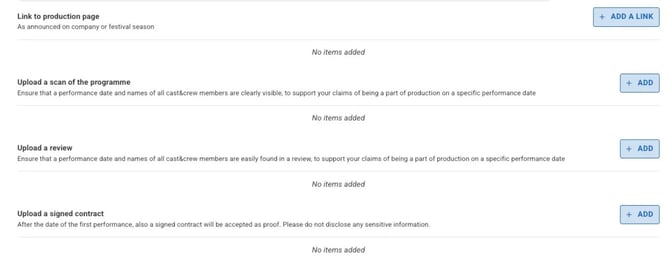
- Upload the necessary documentation to support your validation request (Link to official website production page, programme, review, signed contract).
Please note that the verification process may take some time as we review the information you uploaded. For red mask approval, we require evidence including official branding, full cast and crew list, and details of the venue, dates, and times of the performances. Please see here for more details.
FAQs:
1. What is Request Red Mask?
Artists with an Operabase Artist annual subscription can request performance verification (red mask) to verify any production linked to their profile.
2. How can I request Red Mask?Use the "Request red mask" feature on the desired performance and submit the necessary documentation.
3. Is Request Red Mask a paid feature?Request Red Mask is only available to artists with an annual subscription.
4. What is the difference between a red mask and a grey mask?Red masks indicate verified productions visible across the platform and are visible in Casting Tool search results. Grey masks represent unverified productions visible only on the artist's profile.
5. What evidence can I share while requesting a Red Mask?Evidence includes official branding, full cast and crew list, and details of the venue, dates, and times. This can be in the form of a URL leading directly to the production page or a programme displaying the official branding.
6. Can agents request a Red Mask for artists in their roster?Yes, agents can request a Red Mask for an artist in their roster if the artist's profile has an annual subscription.
7. What happens if the request is rejected?
If your request is rejected, perhaps the submitted materials did not provide sufficient proof of participation.You can request a review appeal by clicking on the button and uploading new evidence/different documentation to prove participation.